main.py
“Pycco” is a Python port of Docco: the original quick-and-dirty, hundred-line-long, literate-programming-style documentation generator. It produces HTML that displays your comments alongside your code. Comments are passed through Markdown and SmartyPants1, while code is passed through Pygments for syntax highlighting.
This version has been modified to correctly handle Python and also to have a few additional output options.
This page is the result of running Pycco against its own source file.
If you install Pycco, you can run it from the command-line:
pycco src/*.py
This will generate linked HTML documentation for the named source files,
saving it into a docs folder by default.
This is a modified version that fixes a number
of bugs (such as this and this)
by using a modified dycco to handle Python files.
This version will also produce stand-alone .md files and .adoc (asciidoc) files.
To install Pycco, simply
pip install pycco
Or, to install the latest source
git clone git://github.com/pycco-docs/pycco.git
cd pycco
python setup.py install
or
git clone git://github.com/rojalator/pycco.git
(You’ll need to
pip install https://github.com/rojalator/dycco
for this pycco version).
The original source for Pycco is available on GitHub, and released under the MIT license.
-
Three extensions to Markdown are available:
Import our external dependencies.
import argparse
import datetime
import os
import re
import sys
import time
import html
from contextlib import suppress
from os import path
from typing import Any
import unicodedata
import pygments
from pygments import formatters, lexers
from markdown import markdown
from dycco import parse as dycco_parse, preprocess_docs, preprocess_code
from pycco.generate_index import generate_index
from pycco.languages import supported_languages
from pycco_resources import css as pycco_cssThis module contains all of our static resources.
from pycco_resources import pycco_templateWe have to muck about a bit because of asciidoc3’s strange behaviour See: AttributeError: module ‘asciidoc3’ has no attribute ‘messages’ for the explanation
import importlib.util
ascii_location = None
ascii_module = importlib.util.find_spec('asciidoc3')
if ascii_module:We found a version of asciidoc3, so record where it is for later use by preprocess_docs()
    ascii_location = ascii_module.submodule_search_locations[0] + '/asciidoc3.py'
import asciidoc3.asciidoc3api as AsciiDoc3API # noqaMain Documentation Generation Functions
Generate the documentation for a source file by reading it in, splitting it up into comment/code sections, highlighting them for the appropriate language, and merging them into an HTML template.
def generate_documentation(source, outdir=None, preserve_paths=True,
                           language=None, encoding="utf8", use_ascii=False, escape_html=False, single_file=False):
    if not outdir:
        raise TypeError("Missing the required 'outdir' keyword argument.")
    code = open(source, "rb").read().decode(encoding)
    return _generate_documentation(file_path=source, code=code, outdir=outdir,
                                   preserve_paths=preserve_paths, language=language, use_ascii=use_ascii,
escape_html=escape_html, single_file=single_file)Helper function to allow documentation generation without file handling.
def _generate_documentation(file_path, code, outdir, preserve_paths, language, use_ascii, escape_html,
                            single_file) -> bytes:
    language = get_language(source=file_path, code=code, language_name=language)
    sections = parse(code, language)
    highlight(sections=sections, language=language, preserve_paths=preserve_paths, outdir=outdir, use_ascii=use_ascii,
              escape_html=escape_html, single_file=single_file)
if single_file:For a single_file we just weld all the gubbins together, the code
sections will have been marked as such via preprocess_code()
        out_lines = []
        for section in sections:
            out_lines.extend([section['docs_text'], '\n', section['code_html']])
        out_text = '\n'.join(out_lines)
        return bytes(out_text, 'utf-8')
    else:
return generate_html(file_path, sections, preserve_paths=preserve_paths, outdir=outdir)We deal with the special case of python which, ironically, Pycco is rather bad at as it thinks that triple-strings can only be docstrings, when they can occur anywhere. Instead we ask dycco to do it for us (although dycco’s sections are labelled with ‘docs’ and ‘code’ instead of ‘docs_text’ and ‘code_text’). There is no guarantee the dycco can parse Cython files.
def _parse_python(code: str) -> dict:
    dycco_sections = dycco_parse(code)
return dycco_sectionsPARSE
Given a string of source code, parse out each comment and the code that follows it, and create an individual section for it. Sections take the form:
{ "docs_text": ...,
  "docs_html": ...,
  "code_text": ...,
  "code_html": ...,
  "num":       ...
}
We process the source-code using the following method - the diagram shows our thinking:
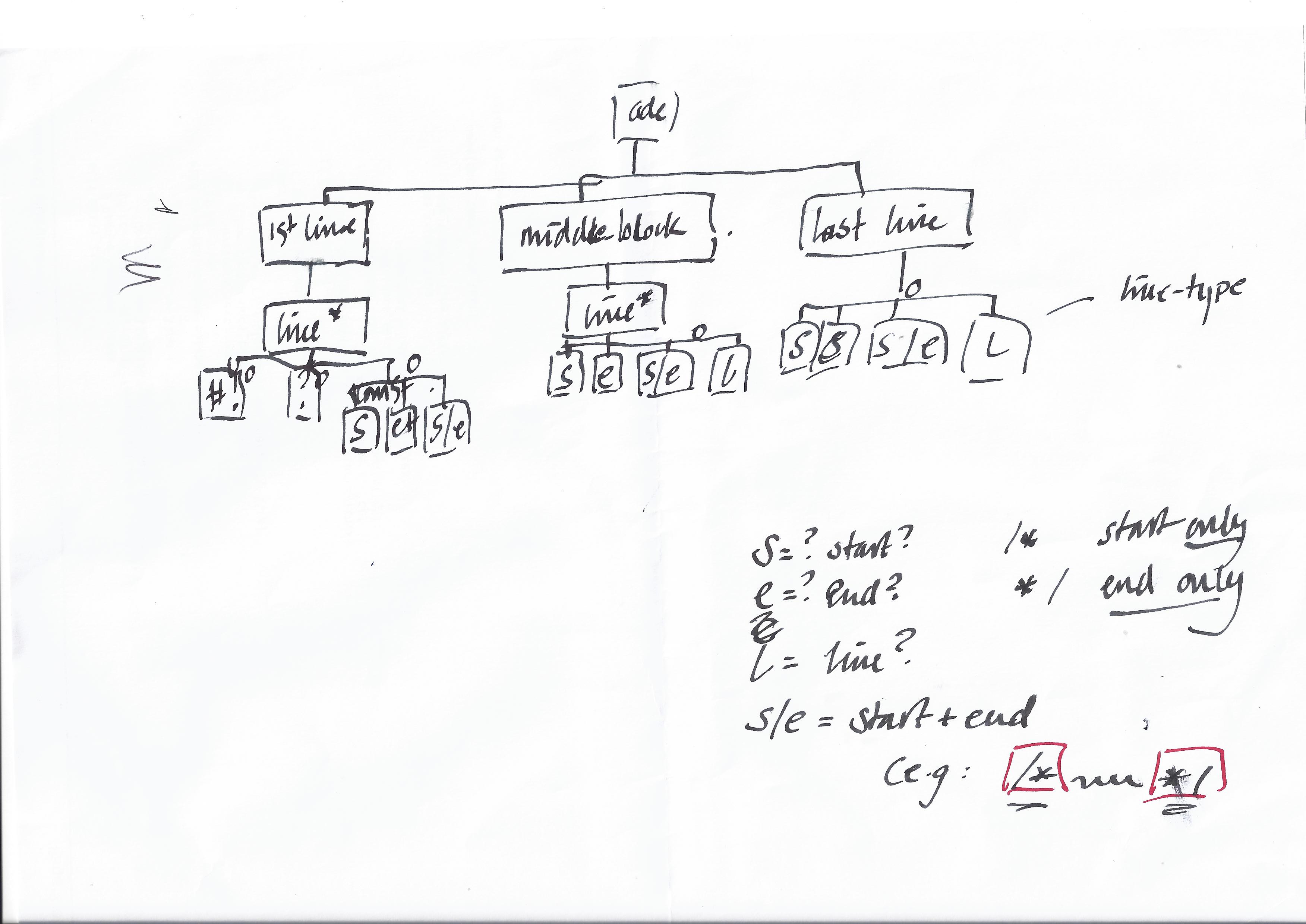
We have (logically) 3 parts of the file: the first line-group, the middle line-group and the last line.
Each line can be:–
- multi_comment_start (e.g.
/*or/* SOME TEXT) - multi_comment_end (e.g.
*/orSOME TEXT */) - multi_comment_start_end (e.g.
/* SOME TEXT */) - single_comment_mark (e.g.
//) - code
- a comment line in a multi_comment
- a code line with a trailing multi_comment_start_end:
x = 5; /* a comment */
We can simplify things my turning multi_comment_start_end lines into
single_comment_mark lines.
def parse(source_code: str, source_language: dict):
    lines: list[str] = source_code.split("\n")
    sections = []
has_code = docs_text = code_text = ""For Python, we just call dycco’s routines via our _parse_python()
It has to be valid code or we’ll get SyntaxError from the AST handler
    if source_language["name"] == "python":
        dycco_sections = _parse_python(source_code)
elif lines[0].startswith("#!"):Skip over lines like “#!/usr/bin/env python3”
lines.pop(0) def save(docs: str, code: str):
if docs or code:
sections.append({"docs_text": docs, "code_text": code})
if source_language["name"] == "python":If we used dycco for Python then we need to turn dycco’s sections [that we got via _parse_python()]
into our own by concatenating into strings and then save()-ing them
for key, value in sorted(dycco_sections.items()):We sometimes get None returned as a list entry, so filter it out
            docs_text = '\n'.join(filter(None, value['docs']))
code_text = '\n'.join(filter(None, value['code']))Trim off any spurious triple-quotes that we sometimes get
            code_text = code_text.removeprefix('"""').removeprefix("'''")
            save(docs_text, code_text)
else:For not-Python, setup the variables to get ready to check for multiline comments
        multi_line = False
        multi_string = False
        multi_comment_start, multi_comment_end = source_language.get("multistart"), source_language.get("multiend")
        comment_matcher = source_language['comment_matcher']
        single_line_comment_symbol = source_language['comment_symbol']
        in_multi_comment = False
        process_as_code = False
        converted_lines = []
for i, line in enumerate(lines):Note that the continue saves a lot of if...else heartache
What about:-
// some text // some more text
or / comment / // comment
or / comment / / another comment /
or / comment / x = 5; / another comment /
or // summat / comment /
            stripped_line = line.strip()
if stripped_line.startswith(multi_comment_start) and stripped_line.endswith(multi_comment_end):Case 3: multi-line on a single line: it’s really single line, so turn it into one
                stripped_line = stripped_line.removesuffix(multi_comment_end)
                stripped_line = ' '.join([single_line_comment_symbol, stripped_line.removeprefix(multi_comment_start)])
                converted_lines.append(stripped_line)
continueConvert multi-comments when we find them: we check in_multi_comment so that we can deal with coffee-script’s ### and ###
if stripped_line.startswith(multi_comment_start) and not in_multi_comment:Case 1: just starts with a multi-line marker
                stripped_line = ' '.join([single_line_comment_symbol, stripped_line.removeprefix(multi_comment_start)])
                converted_lines.append(stripped_line)
                in_multi_comment = True
                continue
if in_multi_comment and not stripped_line.endswith(multi_comment_end):Case 6: We’re in a multi-comment so just add it DON’T ADD THE STRIPPED LINE
                converted_lines.append(' '.join([single_line_comment_symbol, stripped_line]))
                continue
if in_multi_comment and stripped_line.endswith(multi_comment_end):Case 2: Don’t strip the leading spaces
                stripped_line = stripped_line.removesuffix(multi_comment_end)
                converted_lines.append(' '.join([single_line_comment_symbol, stripped_line]))
                in_multi_comment = False
continueCase 7 is a trailing comment which is left in the code
Case 5: If we reach here, we’ve just got plain old code, at last!
            converted_lines.append(line)
for i, line in enumerate(converted_lines):Only go into multiline comments section when one of the delimiters is found to be at the start of a line
            if multi_comment_start and multi_comment_end \
                and any(line.lstrip().startswith(delim) or line.rstrip().endswith(delim)
                        for delim in (multi_comment_start, multi_comment_end)):
                multi_line = not multi_line
                if multi_line and line.strip().endswith(multi_comment_end) and len(line.strip()) > len(multi_comment_end):
                    multi_line = False
                if not line.strip().startswith(multi_comment_start) and not multi_line or multi_string:
                    process_as_code = True
                    if multi_string:
                        multi_line = False
                        multi_string = False
                    else:
                        multi_string = True
else:Get rid of the delimiters so that they aren’t in the final docs
                    line = line.replace(multi_comment_start, '')
                    line = line.replace(multi_comment_end, '')
                    docs_text += line.strip() + '\n'
                    indent_level = re.match(r"\s*", line).group(0)
                    if has_code and docs_text.strip():
                        save(docs_text, code_text[:-1])
                        code_text = code_text.split('\n')[-1]
                        has_code = docs_text = ''
elif multi_line:Remove leading spaces
                if re.match(r' {{{:d}}}'.format(len(indent_level)), line):
                    docs_text += line[len(indent_level):] + '\n'
                else:
                    docs_text += line + '\n'
            elif re.match(comment_matcher, line):
                if has_code:
                    save(docs_text, code_text)
                    has_code = docs_text = code_text = ''
                docs_text += re.sub(comment_matcher, "", line) + "\n"
                process_as_code = False
            else:
                process_as_code = True
            if process_as_code:
                has_code = True
                code_text += line + '\n'
        save(docs_text, code_text)
return sectionsPreprocessing the comments
Add cross-references before having the text processed by markdown. It’s
possible to reference another file, like this : [[main.py]] which renders
main.py. You can also reference a specific section of another file,
like this: [[main.py#highlighting-the-source-code]] which renders as
main.py. Sections have to be manually
declared; they are written on a single line, and surrounded by equals
signs:
=== like this ===
def preprocess(comment, preserve_paths:bool = True, outdir=None):
    if not outdir:
raise TypeError("Missing the required 'outdir' keyword argument.") def sanitize_section_name(name) -> str:
return "-".join(name.lower().strip().split(" ")) def replace_crossref(match) -> str:Check if the match contains an anchor
        if '#' in match.group(1):
            name, anchor = match.group(1).split('#')
            return " [{}]({}#{})".format(name,
                                         path.basename(
                                             destination(name, preserve_paths=preserve_paths, outdir=outdir)), anchor)
        else:
            return " [{}]({})".format(match.group(1),
                                      path.basename(
destination(match.group(1), preserve_paths=preserve_paths, outdir=outdir)))Replace equals-sign-formatted section names with anchor links.
    def replace_section_name(match) -> str:
        return '{lvl} <span id="{id}" href="{id}">{name}</span>'.format(
            lvl=re.sub('=', '#', match.group(1)), id=sanitize_section_name(match.group(2)), name=match.group(2))
    comment = re.sub(r'^([=]+)([^=]+)[=]*\s*$', replace_section_name, comment)
    comment = re.sub(r'(?<!`)\[\[(.+?)\]\]', replace_crossref, comment)
return commentHighlighting the source code
Highlights a single chunk of code using the Pygments module, and runs
the text of its corresponding comment through Markdown or Asciidoc3
(if use_ascii is True).
We process the entire file in a single call to Pygments by inserting little marker comments between each section and then splitting the result string wherever our markers occur.
def highlight(sections, language, preserve_paths=True, outdir=None, use_ascii=False, escape_html=False,
              single_file=False):
    if not outdir:
raise TypeError("Missing the required 'outdir' keyword argument.")(If single_file is True, we would just dump the file with markers and not bother with pygments gubbins here)
    if not single_file:
        divider_text = language["divider_text"]
        lexer = language["lexer"]
        divider_html = language["divider_html"]
        joined_text = divider_text.join(section["code_text"].rstrip() for section in sections)
        html_formatter = formatters.get_formatter_by_name("html")
        output = pygments.highlight(joined_text, lexer, html_formatter).replace(highlight_start, "").replace(
            highlight_end, "")
        fragments = re.split(divider_html, output)
    for i, section in enumerate(sections):
if single_file:Single_file: We need to bracket the code section with the appropriate markers.
We can just get dycco to do it for us via its preprocess_code(): however,
that expects a list and the language
            section['code_html'] = preprocess_code(list([section['code_text']]), use_ascii=use_ascii,
                                                   raw=single_file, language_name=language['name'])
else:Otherwise, carry on as before
            section["code_html"] = highlight_start + shift(fragments, "") + highlight_end
        docs_text = section['docs_text']
        if escape_html:
            docs_text = html.escape(docs_text)
if not single_file:We won’t do any formatting if single_file is set…
if use_ascii:…so process the documentation via asciidoc3 - using dycco, whose preprocess_docs() expects a list
                section["docs_html"] = preprocess_docs(list([docs_text]), use_ascii=use_ascii, escape_html=escape_html,
                                                       raw=single_file)
else:Otherwise, just do as we always did… use Markdown
                section["docs_html"] = markdown(
                    preprocess(docs_text, preserve_paths=preserve_paths, outdir=outdir),
                    extensions=[
                        'markdown.extensions.smarty',
                        'markdown.extensions.fenced_code',
                        'markdown.extensions.footnotes',
                    ]
                )
        section["num"] = i
return sectionsHTML Code generation
Once all of the code is finished highlighting, we can generate the HTML
file and write out the documentation. Pass the completed sections into the
template found in resources/pycco.html.
Pystache will attempt to recursively render context variables, so we must
replace any occurences of {{, which is valid in some languages, with a
“unique enough” identifier before rendering, and then post-process the
rendered template and change the identifier back to {{.
def generate_html(source, sections, preserve_paths=True, outdir=None):
    if not outdir:
        raise TypeError("Missing the required 'outdir' keyword argument")
    title = path.basename(source)
    dest = destination(source, preserve_paths=preserve_paths, outdir=outdir)
    csspath = path.relpath(path.join(outdir, "pycco.css"), path.split(dest)[0])
    for sect in sections:
        sect["code_html"] = re.sub(r"\{\{", r"{{", sect["code_html"])
    date = datetime.datetime.utcnow().strftime('%d %b %Y')
    rendered = pycco_template({"title": title, "stylesheet": csspath, "sections": sections, "source": source, "date": date})
return re.sub(r"{{", "{{", rendered).encode("utf-8")Helpers & Setup
Build out the appropriate matchers and delimiters for each language.
def compile_language(available_language: dict):
    language_name = available_language["name"]
comment_symbol = available_language["comment_symbol"]Does the line begin with a comment?
available_language["comment_matcher"] = re.compile(r"^\s*{}\s?".format(comment_symbol))The dividing token we feed into Pygments, to delimit the boundaries between sections.
available_language["divider_text"] = "\n{}DIVIDER\n".format(comment_symbol)The mirror of divider_text that we expect Pygments to return. We can split
on this to recover the original sections.
    available_language["divider_html"] = re.compile(
r'\n*<span class="c[1]?">{}DIVIDER</span>\n*'.format(comment_symbol))Get the Pygments Lexer for this language.
    available_language["lexer"] = lexers.get_lexer_by_name(language_name)
for entry in supported_languages.values():
compile_language(entry)Get the current language we’re documenting, based on the extension.
def get_language(source, code, language_name=None):
    if language_name is not None:
        for language in supported_languages.values():
            if language["name"] == language_name:
                return language
        else:
            raise ValueError("Unknown forced language: {}".format(language_name))
    if source:
        m = re.match(r'.*(\..+)', os.path.basename(source))
        if m and m.group(1) in supported_languages:
            return supported_languages[m.group(1)]
    try:
        language_name = lexers.guess_lexer(code).name.lower()
        for language in supported_languages.values():
            if language["name"] == language_name:
                return language
        else:
            raise ValueError()
except ValueError:If pygments can’t find any lexers, it will raise its own subclass of ValueError. We will catch it and raise ours for consistency.
raise ValueError("Can't figure out the language! {0}".format(language_name))Compute the destination HTML path for an input source file path. If the
source is lib/example.py, the HTML will be at docs/example.html.
def destination(filepath, preserve_paths=True, outdir=None, replace_dots=False, extension='html'):
    dirname, filename = path.split(filepath)
    if not outdir:
        raise TypeError("Missing the required 'outdir' keyword argument.")
    try:
        name = re.sub(r"\.[^.]*$", "", filename)
    except ValueError:
name = filenameNow we want to, if required, replace dots in the file-name with
underscores in case we have, say, xyz.py and xyz.css where the
last file written would be xyz.html for the css file and we would lose
the output for the Python file. Instead, produce
xyz_py.html and xyz_css.html
if replace_dots:Get the old file extension and put it back on and then replace the dots
        name = name + path.splitext(filepath)[1]
        name = name.replace('.', '_')
    if preserve_paths:
        name = path.join(dirname, name)
dest = path.join(outdir, u"{0}.{1}".format(name, extension))If join() is passed an absolute path, it will ignore any earlier path
elements. We will force outdir to the beginning of the path to avoid
writing outside our destination.
    if not dest.startswith(outdir):
        dest = outdir + os.sep + dest
return destShift items off the front of the list until it is empty, then return default.
def shift(a_list: list, default: Any):
    try:
        return a_list.pop(0)
    except IndexError:
return defaultdef remove_control_chars(s: str) -> str:The unicode category for control characters starts with ‘C’
return ''.join(c for c in s if not unicodedata.category(c).startswith('C'))Sanitize directory string and ensure that the destination directory exists.
def ensure_directory(directory):
    directory = remove_control_chars(directory)
    if not os.path.isdir(directory):
        os.makedirs(directory)
return directoryThe start of each Pygments highlight block.
highlight_start = "<div class=\"highlight\"><pre>"The end of each Pygments highlight block.
highlight_end = "</pre></div>"This function will iterate through the list of sources and if a directory is encountered it will walk the tree for any files.
def _flatten_sources(sources):
    _sources = []
    for source in sources:
        if os.path.isdir(source):
            for dirpath, _, filenames in os.walk(source):
                _sources.extend([os.path.join(dirpath, f) for f in filenames])
        else:
            _sources.append(source)
return _sourcesFor each source file passed as argument, generate the documentation.
def process(sources, preserve_paths=True, outdir=None, language=None,
            encoding="utf8", index=False, skip=False, underlines=False,
            use_ascii=False, escape_html=False, single_file=False):
    if not outdir:
raise TypeError("Missing the required 'directory' keyword argument.")We have a default extension of html…
    extension = 'html'
if single_file:…but if we are wanting a single file, use Markdown’s or Asciidoc3’s extensions
extension = 'adoc' if use_ascii else 'md'Make a copy of sources given on the command line. main() needs the
original list when monitoring for changed files.
sources = sorted(_flatten_sources(sources))Proceed to generating the documentation.
    if sources:
        outdir = ensure_directory(outdir)
        css = open(path.join(outdir, "pycco.css"), "wb")
        css.write(pycco_css.encode(encoding))
        css.close()
generated_files = [] def next_file():
s = sources.pop(0)
dest = destination(s, preserve_paths=preserve_paths, outdir=outdir, replace_dots=underlines,
extension=extension)
with suppress(OSError):
os.makedirs(path.split(dest)[0])
try:
with open(dest, "wb") as f_destination:
f_destination.write(generate_documentation(s, preserve_paths=preserve_paths, outdir=outdir,
language=language, encoding=encoding,
use_ascii=use_ascii,
escape_html=escape_html, single_file=single_file))
print("pycco: {} -> {}".format(s, dest))
generated_files.append(dest)Dycco uses Pythons AST so sometimes returns SyntaxError for bad Python code
            except (ValueError, UnicodeDecodeError, SyntaxError) as e:
                if skip:
                    print("pycco [FAILURE]: {}, {}".format(s, e))
                else:
                    raise
            if sources:
                next_file()
        next_file()
        if index:
            with open(path.join(outdir, "index.html"), "wb") as f:
                f.write(generate_index(generated_files, outdir))
__all__ = ("process", "generate_documentation")Monitor each source file and re-generate documentation on change.
def monitor(sources, opts):The watchdog modules are imported in main() but we need to re-import
here to bring them into the local namespace.
    import watchdog.events
import watchdog.observersWatchdog operates on absolute paths, so map those to original paths as specified on the command line.
    absolute_sources = dict((os.path.abspath(source), source)
for source in sources)A handler for recompiling files which triggered watchdog events.
class RegenerateHandler(watchdog.events.FileSystemEventHandler):Regenerate documentation for a file which triggered an event.
def on_modified(self, event):Re-generate documentation from a source file if it was listed on the command line. Watchdog monitors whole directories, so other files may cause notifications as well.
            if event.src_path in absolute_sources:
                process([absolute_sources[event.src_path]],
                        outdir=opts.outdir,
preserve_paths=opts.paths)Set up an observer which monitors all directories for files given on the command line and notifies the handler defined above.
    event_handler = RegenerateHandler()
    observer = watchdog.observers.Observer()
    directories = set(os.path.split(source)[0] for source in sources)
    for directory in directories:
observer.schedule(event_handler, path=directory)Run the file change monitoring loop until the user hits Ctrl-C.
    observer.start()
    try:
        while True:
            time.sleep(1)
    except KeyboardInterrupt:
        observer.stop()
observer.join()Hook spot for the console script.
def main():
    parser = argparse.ArgumentParser()
    parser.add_argument('-p', '--paths', action='store_true',
                        help='Preserve path structure of original files')
    parser.add_argument('-d', '--directory', action='store', type=str,
                        dest='outdir', default='docs',
                        help='The output directory that the rendered files should go to.')
    parser.add_argument('-w', '--watch', action='store_true',
                        help='Watch original files and re-generate documentation on changes')
    parser.add_argument('-l', '--force-language', action='store', type=str,
                        dest='language', default=None,
                        help='Force the language for the given files')
    parser.add_argument('-i', '--generate_index', action='store_true',
                        help='Generate an index.html document with sitemap content')
    parser.add_argument('-s', '--skip-bad-files', '-e', '--ignore-errors',
                        action='store_true',
                        dest='skip_bad_files',
                        help='Continue processing after hitting a bad file')
    parser.add_argument('-a', '--asciidoc3', action='store_true', default=False, dest='use_ascii',
                        help='Process with asciidoc3 instead of markdown (you will have to install asciidoc3, of course)')
    parser.add_argument('--escape-html', action='store_true', default=False, dest='escape_html',
                        help='Run the documentation through html.escape() before markdown or asciidoc3')
    parser.add_argument('-f', '--single-file', action='store_true', default=False, dest='single_file',
                        help='Just produce a .md or .adoc file in single-column to be processed externally')
    parser.add_argument('-u', '--underlines', action='store_true',
                        help='Replace dots in file extension with underscores before adding the html extension (e.g. x.txt becomes x_txt.html)')
    parser.add_argument('sources', nargs='*')
    args = parser.parse_args()
    if args.outdir == '':
        outdir = '.'
    else:
        outdir = args.outdir
    process(args.sources, outdir=outdir, preserve_paths=args.paths,
            language=args.language, index=args.generate_index,
            skip=args.skip_bad_files, underlines=args.underlines,
            use_ascii=args.use_ascii, escape_html=args.escape_html,
single_file=args.single_file)If the -w / --watch option was present, monitor the source directories for changes and re-generate documentation for source files whenever they are modified.
    if args.watch:
        try:
            import watchdog.events
            import watchdog.observers  # noqa
        except ImportError:
            sys.exit('The -w/--watch option requires the watchdog package.')
monitor(args.sources, args)Run the script.
if __name__ == "__main__":
main()Corner Cases
There are some corner-cases that need thinking about (or test files need to be created) that involve non-matching comment-code pairs (Pycco wants paired blocks):-
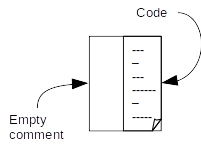
- All code with no comments: we treat this as if there is a magic empty comment before the code.
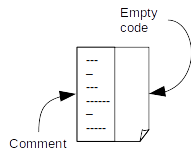
- All comments with no code: we should treat as having a magic empty code block
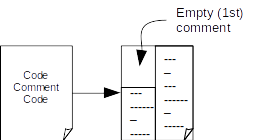
- Code -> comment -> code: that is, no leading comment block (no matching comment/code pair): again,
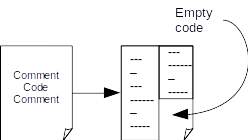
create ourselves an empty comment to make it easy to handle.
- Comment->code->comment: no matching comment/code pair at the end of the file. Surprise! we create a dummy, empty, code-block.